기능
- 각 질환이 적힌 버튼을 통해 질환을 추가하거나 제거할 수 있다.
- 저장 버튼을 누르면 선택한 질환을 토대로 Cloud Firestore에 내 질환 정보가 저장된다.
- 초기화 버튼을 누르면 선택한 모든 질환이 제거된다.
- 해당 페이지에 다시 들어오게 되면 Cloud Firestore에 저장되어 있던 내 질환 정보가 불러와진다.

내 질환 설정 구현
dependencies:
  # Firebase
  cloud_firestore: ^4.4.3
firebase_core: ^2.4.1pubspec.yaml에 사용할 모듈 추가
disease_select.dart
final user = FirebaseAuth.instance.currentUser!;

CollectionReference userProduct =
FirebaseFirestore.instance.collection('user');현재 로그인한 사용자와 Firestore의 user 컬렉션을 가져온다.

List<String> myDisease = []; // firestore에 저장된 내 질환을 화면에 출력하기 위한 리스트
String myDiseaseStr = "";    // firestore에 저장된 내 질환을 화면에 출력하기 위한 문자열

bool isFirst = true; // 페이지에 처음 진입한 것인지 확인하는 변수Map<String, bool> diseaseProducts = {
// 사용자가 새로 구성한 정보
'천식': false,
'아토피': false,
'비염': false,
'혈압': false,
'과민증': false,
'암': false,
'편두통': false,
'당뇨': false,
'간질환': false,
'심혈관질환': false,
};
Map<String, bool> diseaseProductsOrigin = {
// firestore에 저장되어 있는 정보
'천식': false,
'아토피': false,
'비염': false,
'혈압': false,
'과민증': false,
'암': false,
'편두통': false,
'당뇨': false,
'간질환': false,
'심혈관질환': false,
}; StreamBuilder(
// Collection의 Stream을 받아서 전체 Documents의 변경사항을 실시간으로 확인
stream: userProduct.doc(user.uid).collection('disease').snapshots(),
builder: (
BuildContext context,
AsyncSnapshot<QuerySnapshot> streamSnapshot,
) {
if (streamSnapshot.hasData && isFirst) { // 페이지 첫 진입으로 UI가 업데이트 되는 경우
for (var documentSnapshot in streamSnapshot.data!.docs) {
myDisease.add(documentSnapshot['symptom']);
diseaseProducts[documentSnapshot['symptom']] = true;
diseaseProductsOrigin[documentSnapshot['symptom']] = true;
myDiseaseStr += documentSnapshot['symptom'];
if (documentSnapshot['symptom'] !=
streamSnapshot.data!.docs.last['symptom']) {
myDiseaseStr += ", ";
}
}
return showScreen(myDiseaseStr);
} else if (!isFirst) { // 버튼을 눌러서 UI가 업데이트 된 경우
myDiseaseStr = "";
for (var dis in myDisease) {
myDiseaseStr += dis;
if (dis != myDisease.last) {
myDiseaseStr += ", ";
}
}
return showScreen(myDiseaseStr);
}
return const CircularProgressIndicator();
},
),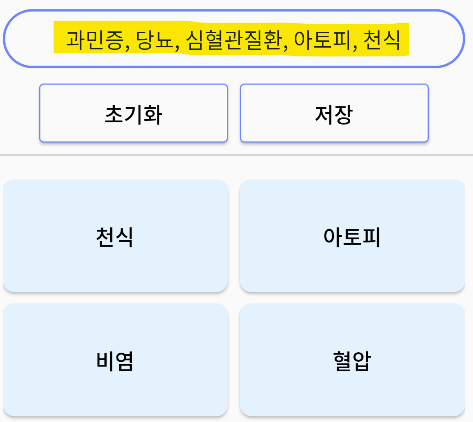
화면 상단의 Container에 Firestore에 저장되어 있는 내 질환 정보를 띄운다. 화면 하단의 버튼을 누르면 해당 Container가 업데이트되어야 하기 때문에 StreamBuilder를 사용하여 데이터의 변화가 있을 때마다 UI를 업데이트한다.
StreamBuilder : stream 처리를 위해 StreamBuilder를 사용한다. StreamBuilder를 사용하면 setState() 함수를 사용하지 않고도 UI를 업데이트할 수 있다. 리스너를 통하여 데이터 변경을 계속 관찰하고 수시로 데이터를 가져와서 변경된 값을 적용한다.
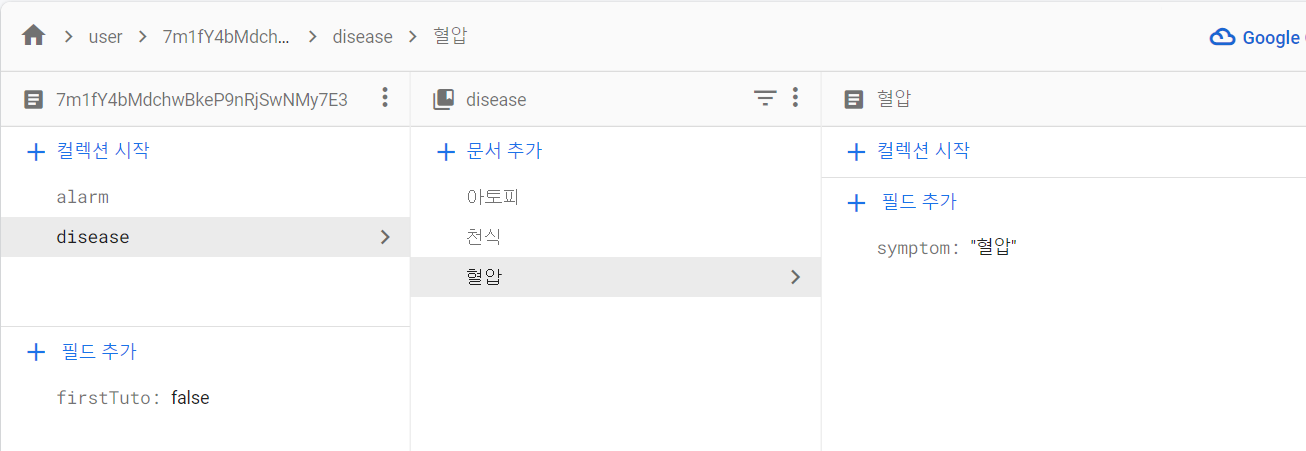
페이지 첫 진입으로 UI가 업데이트되는 경우라면 화면 출력을 위한 리스트(myDisease)에 key인 'symptom'의 value(질환)를 추가한다. 그 후 사용자가 새로 구성한 정보 리스트(diseaseProducts)와 firestore에 저장되어 있는 정보 리스트(diseaseProductsOrigin)에 해당 질병을 각각 true로 만든다. 마지막으로 화면 출력을 위한 문자열(myDiseaseStr)에 해당 질환을 추가한다. 이때, 마지막 document의 'symptom' value가 아니라면 문자열에 콤마를 추가해 준다.
질환 버튼을 눌러서 UI가 업데이트된 경우라면 화면 출력을 위한 리스트(myDisease)에 저장된 질환들을 문자열(myDiseaseStr)에 추가한다. 마찬가지로 리스트의 마지막 값이 아니라면 문자열에 콤마를 추가해 준다.
※ 두 가지 경우를 나누는 이유는 화면에 있는 각각의 질환 버튼을 클릭하면 상단의 Container가 업데이트되지만 Firestore에 저장되는 건 아니기 때문이다.
두 경우 모두 showScreen() 메서드를 return 하여 화면을 출력한다.
  // 초기화 버튼
  ElevatedButton(
    style: ElevatedButton.styleFrom(
      backgroundColor: Theme.of(context).canvasColor,
      fixedSize: const Size(160, 50),
      side: BorderSide(
          width: 1, color: Theme.of(context).primaryColor),
    ),
    child: const Text(
      "초기화",
      style: TextStyle(fontSize: 18),
    ),
    onPressed: () {
      setState(() {
        myDisease = [];
        for (var key in diseaseProducts.keys) {
          diseaseProducts[key] = false;
        }
        isFirst = false;
      });
    },
),초기화 버튼을 누르면 myDisease 리스트가 초기화되고 diseaseProducts 리스트의 모든 값이 false로 변한다.
  // 저장 버튼
  ElevatedButton(
    style: ElevatedButton.styleFrom(
      backgroundColor: Theme.of(context).canvasColor,
      fixedSize: const Size(160, 50),
      side: BorderSide(
          width: 1, color: Theme.of(context).primaryColor),
    ),
    child: const Text(
      "저장",
      style: TextStyle(fontSize: 18),
    ),
    onPressed: () {
      // firestore에 내 질환 저장하기
      for (var dis in diseaseList) {
        if (!diseaseProductsOrigin[dis]! && diseaseProducts[dis]!) {
          userProduct
              .doc(user.uid)
              .collection("disease")
              .doc(dis)
              .set({"symptom": dis});
        } else if (diseaseProductsOrigin[dis]! &&
            !diseaseProducts[dis]!) {
          userProduct
              .doc(user.uid)
              .collection("disease")
              .doc(dis)
              .delete();
        }
      }
      _getRoute(user);
    },
),저장 버튼을 누르면 원래 Firestore에 존재하지 않았지만 사용자가 선택한 질환은 DB에 추가해 주고, 원래 Firestore에 존재했지만 사용자가 제거한 질환은 DB에서 삭제해 준다.
// 질환 선택 버튼을 위한 List<Map>
final List<Map> myProducts =
List.generate(10, (index) => {"id": index, "name": diseaseList[index]}).toList();Flexible(
child: Container(
padding: const EdgeInsets.only(
left: 10, top: 20, right: 10, bottom: 0),
child: GridView.builder(
shrinkWrap: true,
gridDelegate: const SliverGridDelegateWithMaxCrossAxisExtent(
maxCrossAxisExtent: 200,
childAspectRatio: 2 / 1,
crossAxisSpacing: 10,
mainAxisSpacing: 10),
itemCount: myProducts.length,
itemBuilder: (BuildContext ctx, index) {
return ElevatedButton(
style: ElevatedButton.styleFrom(
backgroundColor: themeMode == ThemeMode.light
? Colors.blue.shade50
: Theme.of(context).canvasColor,
fixedSize: const Size(160, 50),
side: BorderSide(
width: 1,
color: themeMode == ThemeMode.light
? Color.fromARGB(0, 1, 1, 1)
: Theme.of(context).primaryColor),
shape: RoundedRectangleBorder(
borderRadius: BorderRadius.circular(10)),
),
onPressed: () {
setState(() {
var disName = myProducts[index]["name"];
if (!diseaseProducts[disName]!) {
myDisease.add(disName);
print(myDisease);
diseaseProducts[disName] = true;
} else {
myDisease.remove(disName);
print(myDisease);
diseaseProducts[disName] = false;
}
isFirst = false;
});
},
child: Text(
myProducts[index]["name"],
style: const TextStyle(fontSize: 18),
),
);
},
),
),
),화면 하단의 버튼들은 GridView.builder를 통해 출력한다.
전체 코드 확인 :
Reference
StreamBuilder https://devmg.tistory.com/183 & https://young-duck.tistory.com/56