UI
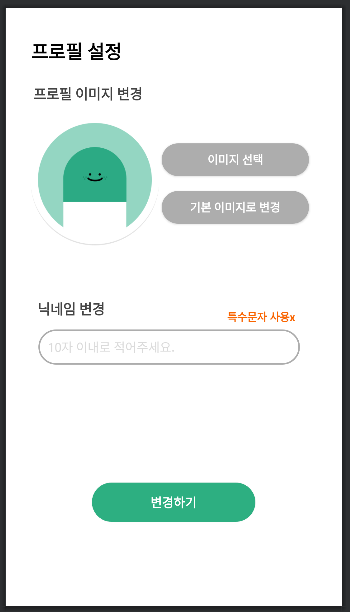
'이미지 선택' 버튼을 통해 앨범에서 이미지를 선택하여 프로필을 변경할 수 있고 '기본 이미지로 변경' 버튼을 통해 기본 프로필로 변경할 수 있다. 닉네임을 변경하려면 editText에 닉네임을 작성한다. 모든 변경은 하단의 '변경하기' 버튼을 눌러야만 반영된다.
프로필 변경 구현
ProfileActivity.kt
getFireBaseProfileImage(currentUser!!.uid)

profile_newImage_btn.setOnClickListener {
    gotoAlbum()
}private fun getFireBaseProfileImage(uid: String) { // 파이어베이스 Storage에서 이미지를 다운받아 프로필에 불러오는 함수
val storage = FirebaseStorage.getInstance()
val storageRef = storage.reference
storageRef.child("profile_img/profile$uid.jpg").downloadUrl.addOnSuccessListener { uri ->
Glide.with(this)
.load(uri)
.into(profile_image_iv)
imageUri = uri
}.addOnFailureListener { }
}getFireBaseProfileImage() 메서드로 현재 프로필 이미지를 가져온다.
profile_newImage_btn(이미지 선택 버튼)을 눌렀을 때 앨범에 진입하여 선택한 이미지를 가져온다.
private val PICK_FROM_ALBUM = 1
private fun gotoAlbum() { // 앨범 진입 함수
val intent = Intent(Intent.ACTION_PICK)
intent.type = MediaStore.Images.Media.CONTENT_TYPE
startActivityForResult(intent, PICK_FROM_ALBUM)
}Intent.ACTION_PICK 파라미터를 통해서 Android Gallery에 진입한다.
CONTENT_TYPE : 이미지 디렉토리의 MIME 유형이다. (자세한 설명 참고)
startActivityForResult를 통해 다른 Activity 로 이동한 후 다시 돌아오게 되면 onActivityResult가 동작되게 된다. 이때 startActivityForResult의 두 번째 파라미터로 보낸 값(여기서는 PICK_FROM_ALBUM)이 requestCode 로 반환되는 동작을 합니다. (자세한 설명 참고)
override fun onActivityResult(requestCode: Int, resultCode: Int, data: Intent?) {
super.onActivityResult(requestCode, resultCode, data)
if (resultCode != RESULT_OK) { // resultCode가 틀렸을 때
Toast.makeText(this, "취소되었습니다", Toast.LENGTH_LONG).show()
return
}
when (requestCode) {
PICK_FROM_ALBUM -> { // requestCode가 일치할 때
imageUri = data?.data
profile_image_iv.setImageURI(imageUri) // 이미지 띄우기
}
}
}Android Gallery에서 해당 Activity 화면으로 되돌아왔을 때 호출되는 onActivityResult() 메서드를 통해 갤러리에서 선택한 이미지를 화면에 띄운다.
onActivityResult() 메서드
첫 번째 인자 requestCode : startActivityForResult() 함수의 두 번째 인자로 넘겨줬던 값과 동일한 값
두 번째 인자 resultCode : 사진을 정상적으로 선택하였다면 RESULT_OK 값이 넘어오며, 뒤로가기 버튼으로 작업을 취소한 경우 RESULT_CANCELED 값이 넘어온다.
세 번째 인자 data : 갤러리 액티비티로부터 넘어온 결과 데이터가 담겨있는 Intent 객체이다.
profile_change_btn.setOnClickListener {
// 데이터베이스에서 사진 변경, 닉네임 변경
MainScope().launch {
changeProfile()
}
Handler().postDelayed({
onBackPressed()
}, 2000) // 2초 정도 딜레이를 준 후 시작
}profile_change_btn(변경하기 버튼)을 눌렀을 때 changeProfile() 메서드를 통해 데이터베이스에서 유저의 사진과 닉네임을 변경한다. 데이터베이스 접근 중 생기는 딜레이를 해결하기 위해 Handler를 이용하여 사용자에게 고의적으로 딜레이를 부여한다.
private fun changeProfile() { // 프로필 변경 함수
if (imageUri != null && profile_name_et.text.isNotEmpty()) { // 둘 다 변경
createProfile_Photo_and_Delete()
database.child("users").child(currentUser!!.uid).child("name").setValue(profile_name_et.text.toString())
} else if (imageUri != null && profile_name_et.text.isEmpty()) { // 이미지만 변경
createProfile_Photo_and_Delete()
} else if(imageUri == null && profile_name_et.text.isNotEmpty()) { // 닉네임만 변경
database.child("users").child(currentUser!!.uid).child("name").setValue(profile_name_et.text.toString())
}else{ // 둘 다 변경x
Log.d(TAG, "NOTHING")
}
Toast.makeText(this, "프로필 이미지 및 닉네임이 변경되었습니다.", Toast.LENGTH_SHORT).show()
}닉네임과 프로필 이미지가 비어있는지 확인하여 상황에 맞게 각각을 변경한다.
닉네임을 변경할 경우 Realtime DB에 저장된 유저 name을 변경해 준다.
프로필 이미지를 변경할 경우 createProfile_Photo_and_Delete() 메서드를 통해서 Storage에 저장된 유저 프로필 이미지를 변경해 준다.
private fun createProfile_Photo_and_Delete() { // 프로필 이미지 생성 및 이전 이미지를 삭제하는 함수
val storage = FirebaseStorage.getInstance()
val storageRef = storage.reference
val filename = "profile" + currentUser?.uid + ".jpg"
val file = imageUri
val riversRef = storageRef.child("profile_img/$filename")
riversRef.putFile(file!!)
}스토리지 인스턴스를 만들고 스토리지를 참조한다.
현재 사용자의 uid를 이용하여 filename을 만들고 해당 Reference(여기서는 riversRef)에 이미지를 저장한다.
<전체 코드>
class ProfileActivity : AppCompatActivity() {
private val PICK_FROM_ALBUM = 1
private var imageUri: Uri? = null
private var auth: FirebaseAuth = FirebaseAuth.getInstance()
private var currentUser = auth.currentUser
var dialogwithUri : Uri = Uri.parse("android.resource://" + R::class.java.getPackage().name + "/" + R.drawable.img_girls)
override fun onCreate(savedInstanceState: Bundle?) {
super.onCreate(savedInstanceState)
setContentView(R.layout.activity_profile)
getFireBaseProfileImage(currentUser!!.uid)
profile_newImage_btn.setOnClickListener {
gotoAlbum()
}
profile_nomal_btn.setOnClickListener {
val storage = FirebaseStorage.getInstance()
val storageRef = storage.reference
val desertRef = storageRef.child("profile_img/profile${currentUser?.uid}.jpg")
desertRef.delete().addOnSuccessListener { }.addOnFailureListener { }
imageUri != null
profile_image_iv.setImageURI(dialogwithUri)
}
profile_change_btn.setOnClickListener {
// 데이터베이스에서 사진 변경, 닉네임 변경
MainScope().launch {
changeProfile()
}
Handler().postDelayed({
onBackPressed()
}, 2000) // 2초 정도 딜레이를 준 후 시작
}
}
private fun gotoAlbum() { // 앨범 진입 함수
val intent = Intent(Intent.ACTION_PICK)
intent.type = MediaStore.Images.Media.CONTENT_TYPE
startActivityForResult(intent, PICK_FROM_ALBUM)
}
override fun onActivityResult(requestCode: Int, resultCode: Int, data: Intent?) {
super.onActivityResult(requestCode, resultCode, data)
if (resultCode != RESULT_OK) { // resultCode가 틀렸을 때
Toast.makeText(this, "취소되었습니다", Toast.LENGTH_LONG).show()
return
}
when (requestCode) {
PICK_FROM_ALBUM -> { // requestCode가 일치할 때
imageUri = data?.data
profile_image_iv.setImageURI(imageUri) // 이미지 띄우기
}
}
}
private fun changeProfile() { // 프로필 변경 함수
if (imageUri != null && profile_name_et.text.isNotEmpty()) { // 둘 다 변경
createProfile_Photo_and_Delete()
database.child("users").child(currentUser!!.uid).child("name").setValue(profile_name_et.text.toString())
} else if (imageUri != null && profile_name_et.text.isEmpty()) { // 이미지만 변경
createProfile_Photo_and_Delete()
} else if(imageUri == null && profile_name_et.text.isNotEmpty()) { // 닉네임만 변경
database.child("users").child(currentUser!!.uid).child("name").setValue(profile_name_et.text.toString())
}else{ // 둘 다 변경x
Log.d(TAG, "NOTHING")
}
Toast.makeText(this, "프로필 이미지 및 닉네임이 변경되었습니다.", Toast.LENGTH_SHORT).show()
}
private fun createProfile_Photo_and_Delete() { // 프로필 이미지 생성 및 이전 이미지를 삭제하는 함수
val storage = FirebaseStorage.getInstance()
val storageRef = storage.reference
val filename = "profile" + currentUser?.uid + ".jpg"
val file = imageUri
val riversRef = storageRef.child("profile_img/$filename")
riversRef.putFile(file!!).addOnSuccessListener { }.addOnFailureListener { }
}
private fun getFireBaseProfileImage(uid: String) {  // 파이어베이스 Storage에서 이미지를 다운받아 프로필에 불러오는 함수
    val storage = FirebaseStorage.getInstance()
    val storageRef = storage.reference
    storageRef.child("profile_img/profile$uid.jpg").downloadUrl.addOnSuccessListener { uri ->
        Glide.with(this)
            .load(uri)
            .into(profile_image_iv)
        imageUri = uri
    }.addOnFailureListener { }
}
}[Reference]
startActivityForResult&onActivityResult https://themangs.tistory.com/entry/startActivityForResult-onActivityResult
갤러리 앱 실행 결과 처리 https://develop-writing.tistory.com/78